Craft Wall · 2026
Platform live · 24/7
EN · Mission Control Software

See everything.Control everything.From a single window.

The intelligent video wall management platform for teams that cannot afford to miss a single second. Cameras, dashboards, maps, conferences, analytics — dozens of sources on one canvas, with control over each one — in the same window, with no app switching.

01
Continuous 24/7 operationThe platform restores any failed source in seconds — automatically
02
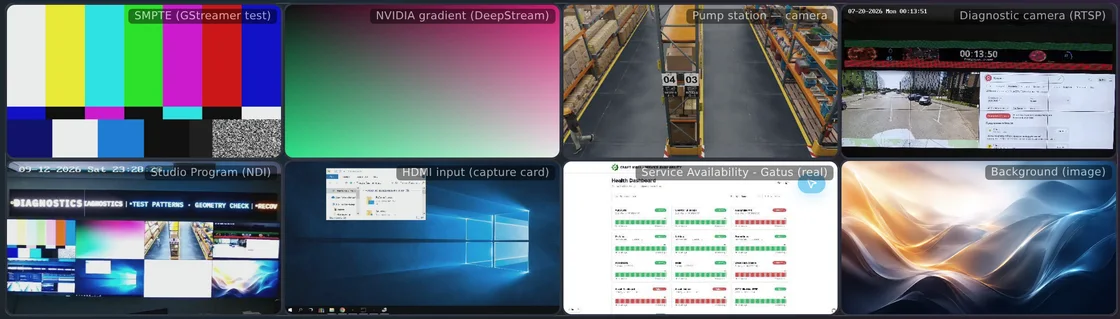
Any source on a single screenCameras, web dashboards, documents, conferences, RDP
03
Browser-based controlZero installation. Any device. Multiple operators
Scroll

Your control room
deserves more

Operators in situation centres, NOC and control rooms watch 15–20 dashboards at once — and miss up to 30% of critical events. Craft Wall changes how the work itself is done.

Problem · 01

Noise instead of signal

Operators drown in dashboards and alerts: 60–80% of them are false or non-critical. The truly important events get lost in the flood.

of critical events
are missed by operators

AI analytics highlight what mattersThe system spots anomalies in video streams and dashboard metrics, then promotes the alarming source to the centre of the wall. Everything else moves to the periphery.
Problem · 02

A patchwork of apps instead of one console

Cameras live in the VMS, Grafana in the browser, SCADA in a third app, conferencing in a fourth. To watch you switch — to act, you switch again. The operator never sees the whole picture and cannot manage the situation with a single gesture.

apps and dashboards
on the operator's desk

One console: watch and controlCameras, dashboards, documents, RDP, video conferencing, NDI — dozens of sources of any kind on one wall. And every interaction happens in the same window: drag a source, open RDP, take the conference mic, label a camera, switch a scene. No more app switching.
Problem · 03

Seconds matter, the system stalls

A camera freezes, the network blinks, a server drops. Every minute of downtime in critical systems costs thousands of dollars.

lost
per minute of downtime

Self-healing in secondsThe platform detects a source failure on its own and brings the picture back to the same place at the same size. One camera failure does not bring down the rest.
Problem · 04

The video wall is just wallpaper

Most centres run a fixed window layout on the wall. When an incident occurs, the operator drags windows around manually, losing precious seconds.

for manual reflow
during an alarm

Event-driven automationA signal from the fire alarm, access control or monitoring switches the wall to an alarm scene: the incident zone takes half the wall, related cameras alongside. After a timer — automatic return to working mode.
Problem · 05

The hardware controller is the bottleneck

A fixed input count, a single point of failure, expensive redundancy. Replacing a source means a call to the integrator. Every change is budgeted in months.

sources
with no hardware swap

A software platform on a standard serverA standard server with an NVIDIA GPU on Linux. Hot redundancy, updates and new sources — without swapping hardware and without vendor lock-in.
Problem · 06

A distributed team sees a different reality

An engineer at home, a director in the meeting room, a field technician on site — each sees a different slice of the picture. Sync over phone calls and screenshots breaks down at the critical moment.

console
on any device

The browser is the only clientA laptop, tablet or smartphone gives full access to the same wall. Multiple operators work simultaneously, and every change syncs instantly.
[ Key metrics ]Craft Wall · 2026
50+
sources
in parallel
<10%
CPU
utilisation
on a baseline configuration with 1080p streams
24/7
continuous
operation
8K
maximum
resolution
0
apps to
install
3 sec.
detection
and recovery

A platform,
not a controller

Craft Wall is not a “hardware box with inputs”. It is a full software environment for managing everything the operator pushes onto the wall. Below — the things that actually change how a control centre works.

2.02
Four-layer resilience

A wall that never goes dark.
Even when something fails.

Plain auto-reconnect handles a flickering network — and not much more. Craft Wall is built on four independent layers of defence, each one catching a failure before the operator can even notice. This is not “the camera dropped — we restarted it”, this is a systemic approach to continuity, from a single source all the way to the entire server.

  • 1 · Source · process isolationEvery camera, dashboard and conference runs in its own sandbox. A failed source does not drag the others down — one window breaks, not the whole wall. Auto-restart in seconds.
  • 2 · Cell · fallback content and geometryIf the source has not recovered, the same cell is filled with a fallback: a neighbouring camera, the last successful frame, or a “no signal” placeholder with the cause. Once recovered, the picture returns to the same place, with the same size and z-order.
  • 3 · Server · hot standbyA second server in the cluster keeps a synchronous copy of scenes, layouts and source state. On primary failure — switchover in seconds, with no operator action and no loss of wall composition.
  • 4 · Scene · prioritisation under loadWhen the GPU, network or link to a remote site is saturated, Craft Wall keeps critical sources at full size and maximum quality, while compressing or hiding the secondary ones. The incident stays visible when the hardware is at its limits.
↳ Zero “black holes” on the wall in the critical moment · detection and recovery within seconds
2.03
Image pipeline

Read the data, don't guess

An operator's worst pain — when the text on a dashboard, shrunk to a quarter of the screen, becomes an unreadable smear. Craft Wall solves that: dedicated image pipeline algorithms preserve crisp text even in the smallest windows.

Instrument readings, camera labels, table data — all readable without effort. Six interpolation quality levels: from maximum speed to maximum text crispness. Dashboards get top quality. Video streams get a balanced mode.

2.04
Zero-install control

Open a browser — and you're already controlling the wall

Craft Wall requires no software installation to operate. Open any modern browser — Chrome, Firefox, Edge, Safari — on a laptop, tablet or smartphone, and you have a fully functional control console.

Multiple operators work simultaneously: everyone sees the same wall state and is notified instantly of each other's changes. Window moves, source additions, scene switches — all sync in real time.

For rooms with physical consoles, a dedicated touchscreen interface is available — large touch-friendly elements and gesture controls.

2.05
Visual editor

Arrange windows as easily as on a desktop

At the heart of the control surface is a graphical wall editor. You see a scaled-down copy of the wall and work with windows just like windows on a computer:

  • DragDrag windows with the mouse to any position
  • ScalePull an edge or corner to resize
  • SnapAutomatic grid snap for tidy layouts
  • Z-orderManage layers — what's in front, what's behind
  • OverlayStack windows in any order

Every change applies instantly — the physical wall updates in real time, in sync with the mouse.

2.06
Scenes · Presets

One action — and the wall is fully reshaped

Save frequently used configurations as scenes and switch between them in seconds:

  • Day modeAll perimeter cameras in a grid, security dashboard on the right, site map at the bottom
  • IncidentCamera of the incident zone takes half the wall, supporting cameras on the other half
  • MeetingVideo conference in the centre, presentation on the side, agenda along the edges
  • NightCritical cameras and system dashboards only, dark background

Scenes can be created, cloned and edited. The reshape happens automatically — sources stop, rebuild and start in the new configuration.

2.07
Automation

The system keeps working, even when the operator can't keep up

Scene scheduler. The wall switches layouts on schedule. Day mode at 08:00 on weekdays, night at 20:00, meeting mode every Tuesday at 10:00.

Alarm scenarios. Fire alarm, access control, security sensors send a signal — and the wall switches instantly to the alarm layout. The camera of the incident zone goes full screen. After the timer — automatic return.

Source carousel. Automatic cyclical rotation of cameras in a single window. Set the list and interval — the system rotates each in turn.

Visual scenario editor. Build complex logical chains of actions without writing code — through a friendly visual interface, by dragging blocks.

2.08
Intelligent analytics

The system watches for you — and surfaces what matters

It is physically impossible for an operator to watch 50 cameras at once. Craft Wall takes that on: built-in algorithms analyse video streams and dashboard data, detecting anomalies in real time.

Auto-promote alarming cameras — when motion is detected, the camera is automatically pushed to the centre of the wall, enlarged. Dashboard monitoring — the system tracks metrics and alerts when they cross thresholds. Layout optimisation — analysing operator interaction frequency to suggest where windows should sit.

All algorithms run directly on the server's GPU — no extra hardware, no cloud dependency.

2.09
Enterprise security

Enterprise-grade protection

Multi-layer access protection with full corporate standards support:

  • MFAMulti-factor authentication: one-time passwords (TOTP), recovery codes
  • SSOSingle sign-on via Azure AD, Okta, Google Workspace (OIDC standard)
  • LDAP / ADSync with the organisation's existing user directory
  • RBACFlexible role system: who watches, who controls, who configures
  • Linux coreMinimal attack surface, no licensing costs, round-the-clock stability
2.10
High availability

The wall keeps running, even if a server goes down

For mission-critical sites — automatic failover to the standby server when the primary fails. Hot redundancy with state synchronisation: the wall keeps working without interruption. The operator won't notice the switch — every source, layout and preset is preserved.

Each source on the wall runs in isolation. One camera failure will never affect the others. The configuration is automatically saved and fully restored after a reboot.

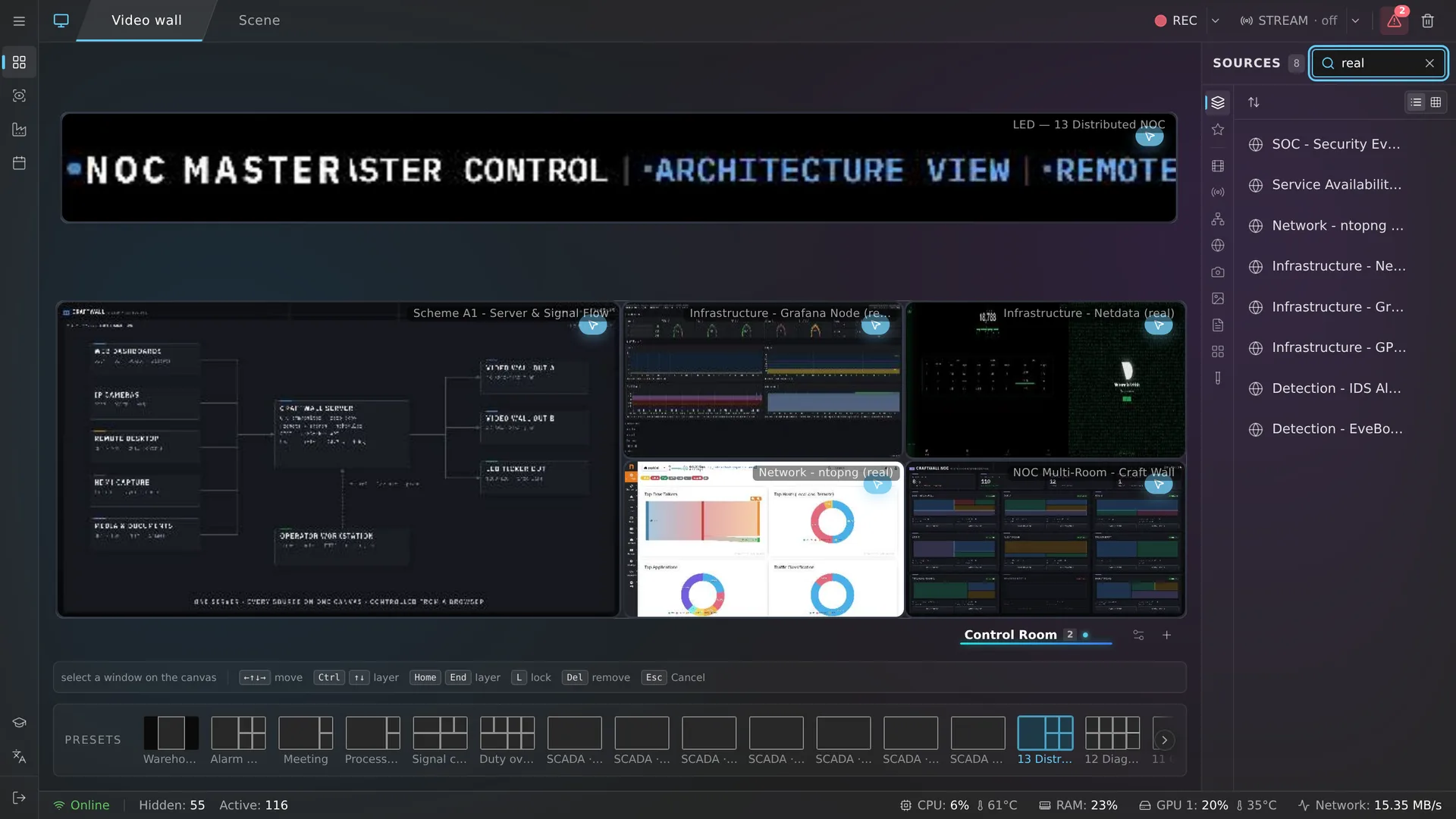
This is the real Craft Wall operator console

What you see is not a video or screenshots — it is the live interface a control room operator works in. Drag sources onto the canvas, switch scenes, open the alert panel — just like a real shift.

Connecting to the console…
Connecting to the operator console…
All features behave exactly as in the production system: window dragging, instant scene switching, live source previews, alert moderation, conference rooms. The demo runs on an isolated stand — none of your actions affect anything.

A solution for any task
where every second counts

01

Situation centres and control rooms

Continuous monitoring of dozens of cameras and information systems. Perimeter video streams, control system data, site map, weather data. On an incident — instant switch to the alarm scene.

02

NOC / SOC

Grafana, Zabbix, Prometheus and Nagios dashboards update in real time. The operator monitors the state of hundreds of infrastructure nodes on a single screen and can drill into any chart directly on the wall.

03

Boardrooms and conference rooms

Video conferencing, presentation, agenda and documents on one wall. Remote participants see the wall content via broadcast. Hardware SIP/H.323 endpoints connect through the built-in media server.

04

Industrial sites and energy

Plant cameras, sensor data, automation panels, fire alarm systems. Self-healing on failure ensures uninterrupted monitoring of critical processes.

05

Transport and logistics

Monitoring of transport hubs, intersection cameras, GPS tracking, information boards. Dynamic layout switching depending on the operational situation.

06

Television and media studios

NDI integration with professional gear. Multi-window composition for director monitoring. Capture from cameras, mixers and playback servers.

07

Retail and exhibition spaces

Dynamic content: video clips, web pages, images. Touch-panel control. Looped video presentations with automatic playback.

08

Classrooms

Show learning materials, presentations and web resources on a large screen. Control via the teacher's tablet. Display multiple sources simultaneously for comparison.

09

Government control centres

Enterprise-grade security, runs on Linux without western dependencies, supports mass deployment across multiple sites, complies with corporate access standards.

Craft Wall
vs. other solutions

Craft Wall is a software platform that runs on standard servers with NVIDIA GPUs. Unlike hardware controllers, it isn't capped by physical inputs. Unlike other software solutions, it ships with self-healing, video-conferencing integration and AI analytics out of the box.

ParameterCraft WallHardware controllersOther software
Source countUnlimitedFixed (8–16)Limited by license / CPU
ControlWeb browser, no installDedicated software, licensesClient app
Self-healingAutomatic, secondsManual restartNone or partial
Text qualityCrystal-clearDepends on hardwareBlurry when downscaled
InteractivityWeb, RDP, KVM, click on the wallDisplay onlyLimited
Source typesCameras, web, NDI, files, VNC/RDP, documents, conferencing, IoTVideo streams onlyVideo + a limited set
Conferencing integrationBuilt-in, two-wayNoneThrough third-party software
AutomationSchedules, alarms, scenarios, scriptsNone or basicBasic
AI analyticsBuilt-in, on GPUNoneNone or external service
SecurityMFA, SSO, OIDC, LDAPPlain passwordPassword or LDAP
High availabilityHot standby + self-healingDepends on the modelPartial
LicensingNo source capsBy input/output countBy number of seats

Runs on standard
hardware

No specialised controllers required. A standard server with an NVIDIA GPU, monitors with HDMI or DisplayPort — and you're ready to go.

Server

NVIDIA GPU, Linux, 8 GB RAM and up, SSD, gigabit network. No specialised controllers.

Displays

Any monitors with HDMI / DisplayPort / DVI. LCD, LED and LED panels. Mixed resolutions and sizes.

Workstation

Any modern browser. No software install. Works from a tablet or smartphone.

Resolution

From Full HD up to 8K. Supports arbitrary video wall configurations — from a single screen to a 5×5 array and beyond.

Ready to discuss your project

See Craft Wall in action.

Book a personal demo — we'll show you how the platform addresses your organisation's specific tasks. We'll size the configuration and price it together.