Kurz gesagt
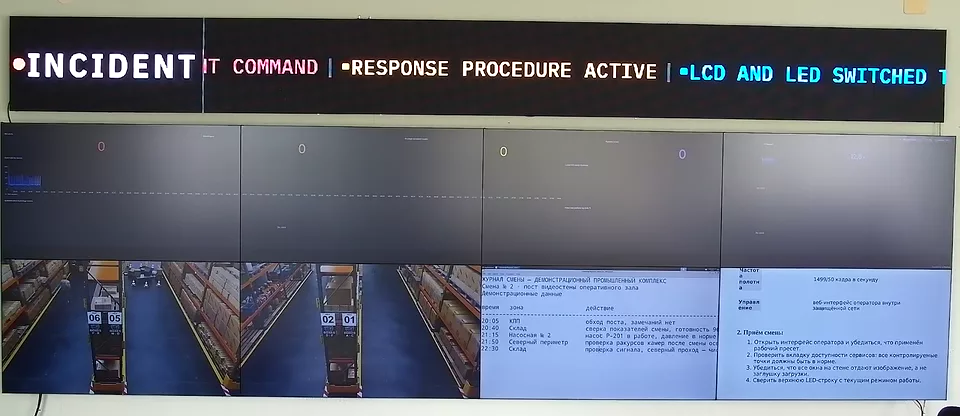
Eine Command-Center-Videowand ist die gemeinsame Visualisierungsebene für einen Raum, in dem mehrere Teams unter einer formalen Befehlsstruktur koordinieren. Bei einem Projekt für eine militärische Command-Center-Videowand, C4ISR-Videowand oder JOC-Videowand sollte die Wand das Lagebild sichtbar, auditierbar und lesbar machen, ohne selbst zum primären Befehlssystem zu werden.
Kurze Antwort: Eine JOC-Videowand sollte das gemeinsame Lagebild, ISR- oder Feldvideo, den Kommunikationsstatus, Logistik, Wetter, Bereitschafts-Dashboards und Briefing-Layouts auf einer kontrollierten Anzeigefläche tragen. Sie sollte nicht die primären C2-, CAD-, Dispatch-, Funk- oder Missionskonsolensysteme ersetzen. Die praktische Anforderung ist kontrollierte Sichtbarkeit: freigegebene Quellen, benannte Presets, Audit-Logs, rollenbasierte Wandsteuerung und ein On-Prem- oder Air-Gap-fähiges Bereitstellungsmuster, wo abgeschottete Räume es erfordern.
Command-Center-Videowand: die nützliche Definition
Der Begriff umfasst mehrere verwandte Räume: behördliche Lagezentren, Joint Operations Center, Verteidigungs-Kommandoräume, Notfall-Koordinationsräume, Public-Safety-Fusionsräume und mobile Gefechtsstände. Sie unterscheiden sich nach Auftrag, teilen aber ein Wandproblem: Karten, Video, Dashboards, Alarme, Kommunikationsstatus, Logistik, Wetter und Vorfallkontext müssen für Kommandeure und Verbindungsteams gleichzeitig sichtbar sein.
Die Wand ist nicht die Befehlskette. Sie ist die visuelle Fläche rund um diese Kette. Primäre C2-, CAD-, Dispatch-, Aufklärungs-, SCADA-, Funk- oder Missionsanwendungen bleiben auf ihren freigegebenen Bedienerkonsolen. Die Wand stellt freigegebene Ansichten aus diesen Systemen dar, damit der Raum ein gemeinsames Lagebild hat.
C4ISR-Videowand: Visualisierung, kein Ersatz
Eine C4ISR-Videowand sollte als Visualisierungsebene für Quellen aus Führung, Steuerung, Kommunikation, Computern, Aufklärung, Überwachung und Erkundung spezifiziert werden. Das bedeutet nicht, dass die Wand zum C4ISR-System wird. Es bedeutet, dass der Raum ausgewählte schreibgeschützte Ansichten aus Missionssystemen, Sensor-Feeds, Karten, Bereitschafts-Dashboards und Kommunikationsstatus in einem gemeinsamen Layout darstellen kann.
- Gemeinsames Lagebild: Karten-, Track-, Vorfall- oder Interessengebiets-Ansichten, dimensioniert für den gesamten Raum.
- ISR- und Feldvideo: freigegebene Kamera-Feeds, Fernbeobachtungs-Feeds, lokales CCTV oder simulierte/Trainings-Feeds.
- Kommunikationsstatus: Übersichten zu Funk-, Netzwerk-, Satelliten- oder Dienstverfügbarkeit, dargestellt als Dashboards.
- Logistik und Bereitschaft: Dashboards zu Anlagenzustand, Personalverfügbarkeit, Transport, Versorgung und Wartung.
- Briefing-Modus: ein kontrolliertes Layout für Kommandeur-Updates, Schichtübergabe, Nachbesprechung oder Übungswiedergabe.
JOC-Videowand: Quellenmix
Eine JOC-Videowand benötigt in der Regel mehr Quellenvielfalt als ein Leitstand mit nur einem Zweck. Ein Joint Operations Center vereint Operations-, Aufklärungs-, Logistik-, Kommunikations-, Öffentlichkeitsarbeits- und Verbindungsteams. Die Wand sollte Zonen unterstützen, damit jede Funktion ihre eigene Ansicht behalten kann, während ein Kommandeur eine Quelle auf die Hauptfläche hervorheben kann.
Behandeln Sie die Quellenliste als lebendes Inventar. Einige Quellen sind immer sichtbar, einige werden in Standby-Presets vorgehalten und einige werden nur während eines Ereignisses hervorgehoben. Der Leitfaden zu Videowand-Sizing und Quellenanzahl behandelt dieses Arbeitsblatt im Detail.
Anforderungen an eine militärische Command-Center-Videowand
Eine militärische Command-Center-Videowand hat normale Wandanforderungen – lesbare Fläche, zuverlässige Quellenaufnahme, schnelle Layout-Wechsel und Failover – plus ein strikteres Betriebsmodell. Die wichtigen Anforderungen sind in der Regel lokale Steuerung, Netzwerk-Isolation, rollenbasierter Betrieb, Audit-Logs, Offline-Update-Verfahren und eine klare Trennung zwischen Visualisierungs- und Aktionssystemen.
- Betrieb ohne Cloud: Layouts, Benutzer, Logs, Lizenzen und Quelldefinitionen bleiben innerhalb der freigegebenen Umgebung. Kombinieren Sie dies mit dem Air-Gap-Videowand-Leitfaden.
- Schreibgeschützte Quellendisziplin: die Wand stellt freigegebene Ansichten dar; die primäre Aktion bleibt auf der Missionskonsole, der Dispatch-Konsole oder dem zertifizierten Bedienerarbeitsplatz.
- Bedienerrollen: Wachoffiziere, Verbindungsteams, Briefing-Personal und Administratoren sollten nicht ein einziges uneingeschränktes Steuerungskonto teilen.
- Verhalten im Degraded-Modus: eine ausgefallene Quelle, ein verlorenes Netzwerksegment oder ein abgelaufenes Zugangsdatum sollte nicht die gesamte Wand schwarz schalten.
- Auditierbarkeit: Preset-Änderungen, hervorgehobene Quellen, ausgefallene Quellen und Bedieneraktionen benötigen ausreichende Protokollierung für die Vorfallanalyse.
Behördliche Command-Center-Wand vs. EOC-Wand
Eine behördliche Command-Center-Wand und eine EOC- oder Krisenmanagement-Wand überschneiden sich, doch die Käuferabsicht ist eine andere. EOC-Räume sind aktivierungsgetrieben: Blue-Sky-Training, Grey-Sky-Bereitschaft, Red-Sky bei aktivem Vorfall. Command Center laufen unter Umständen durchgehend, können klassifizierte oder eingeschränkte Workflows verarbeiten und können ein stärkeres Befehlsketten-Modell haben.
Wenn das Projekt vorrangig Notfallmanagement, öffentliche Sicherheit, Koordination bei Massenanfall von Verletzten oder ein Incident-Response-Raum ist, nutzen Sie den Leitfaden für Videowände in Krisenmanagement-Räumen. Wenn das Projekt eine ständige Behörden-, Verteidigungs-, Joint-Operations- oder Gefechtsstand-Wand ist, ist diese Seite der bessere Ausgangspunkt.
Sizing, TCO und Ausschreibungssprache
Kommandoräume werden häufig als Display-Anzahl unterspezifiziert und als bevorzugte Controller-Marke überspezifiziert. Ein besseres Anforderungsdokument listet die Quellklassen, die Anzahl aktiver Quellen, die Anzahl Standby-Quellen, das Verhalten hervorgehobener Quellen, Bedienerrollen, Failover, Audit-Anforderungen und den Offline-Support-Pfad auf. Dann kann der Käufer softwaredefinierte, Hardware-Controller- und Abonnement-Wände am selben Raummodell vergleichen.
Nutzen Sie den Videowand-TCO-Rechner für das Kostenmodell und den Vergleich der besten Videowand-Software für die Auswahlliste der Anbieter-Architekturen. Wenn der bestehende Raum um Appliances herum aufgebaut ist, vergleichen Sie den Refresh-Pfad mit der Datapath-Fx4-Alternative.
Wo Craft Wall passt
Craft Wall passt zu Command-Center-Projekten, bei denen die Wand eine lokale, softwaredefinierte Visualisierungsebene ist: Browser-Dashboards, RTSP- / NDI-Video, HDMI-Erfassung, Remote-Desktops über RDP / VNC, lokale Layouts, rollenbewusste Steuerung und eine unbefristete Lizenz auf einem On-Prem-Linux-Server mit NVIDIA-GPU. Sie ist am stärksten, wenn der Käufer kein Abonnement pro Display, keine verpflichtende Hersteller-Cloud und einen Quellenmix wünscht, der sich schneller ändert als ein Appliance-Refresh-Zyklus.
Sie ist kein Ersatz für klassifizierte Missionssysteme, zertifizierte Dispatch-Systeme, sicherheitskritische Steuerungsketten oder primäre Waffen- / Infrastruktur-Steuerungsanwendungen. Nutzen Sie sie, um das freigegebene Lagebild rund um diese Systeme darzustellen, nicht um Autorität von ihnen auf die Wand zu verlagern.
Weiterlesen
Nutzen Sie diese Seite zusammen mit dem Leitfaden für Air-Gap- und souveräne Videowände, dem Videowand-Sizing-Leitfaden, dem Vergleich der besten Videowand-Software, dem Videowand-Kostenrechner, dem Leitfaden zu Videowand-RBAC, -SSO und -API, der Datapath-Fx4-Alternative, der Userful-Alternative, dem Leitfaden für Krisenmanagement-Räume, und dem Leitfaden für Stadion-Betriebs-Videowände, für die öffentliche Sicherheit am Veranstaltungstag und den Veranstaltungsbetrieb. Prüfen Sie außerdem die NOC-Referenzarchitektur vor dem Schreiben der endgültigen Spezifikation.