Kurz gesagt
Eine Versorger-Dispositions-Videowand ist die gemeinsame visuelle Ebene eines Leitstands bei Energieversorgern, Netzbetreibern und Stadtwerken, der kritische Infrastruktur überwacht: SCADA-Alarme, EMS- / DMS-Zustand, GIS-Karten, Störungstickets, Wetter, CCTV, Feldmannschaftsstatus und Incident-Response-Ansichten. Die Wand sollte nicht die zertifizierte Bedienkonsole oder das SCADA-HMI ersetzen. Sie sollte das sekundäre gemeinsame Lagebild rendern, das Disponenten, Vorgesetzte und Incident-Koordinatoren zusammen sehen müssen.
Kurz gesagt: Eine Versorger-Dispositions-Videowand sollte SCADA- / EMS- / DMS-Übersichten, GIS-Karten, Störungsreaktion, Wetter, Kameras, Arbeitsaufträge und Feldmannschaftszustand kombinieren, ohne in die zertifizierte Steuerkette einzutreten. Die Wand ist der Ort, an dem der Raum den Vorfall gemeinsam sieht; Schalthandlungen, Schutz, Dispositionsbefehle und zugelassene HMI-Workflows bleiben auf den primären Bedienkonsolen.
Energieleitstellen-Videowand: Was auf die Wand gehört
Eine Energieleitstellen-Videowand verdient ihren Platz, wenn sie den Netzzustand mit operativem Kontext verbindet. Ein nützlicher Basis-Quellenmix umfasst:
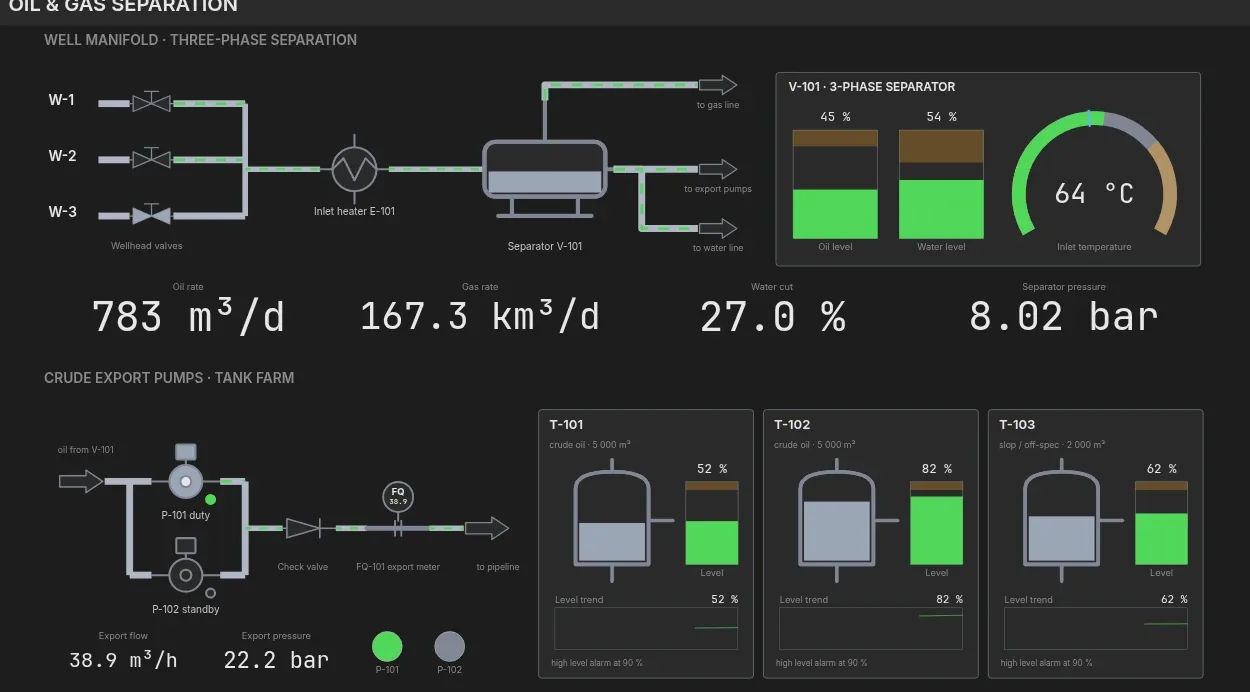
- SCADA- / EMS- / DMS-Übersicht: Alarme, Schaltzustand, Abgangsstatus, Umspannwerke, Erzeugung und Verteilungsgesundheit.
- GIS- und Störungsschicht: Netzkarte, Störungscluster, betroffene Kunden, Mannschaften, geschätzte Wiederherstellung und vorrangige Anlagen.
- Wetter und externes Risiko: Stürme, Waldbrandrisiko, Überflutung, Wind, Hitze und vorgelagerte Incident-Bulletins.
- Visuelle Beweise: Umspannwerk-Kameras, Damm- / Pumpstation-Kameras, Leitstand-CCTV und RTSP-Feeds von Feldstandorten.
- Reaktions-Schicht: Arbeitsaufträge, Mannschaftseinteilung, Call-Center-Last, Management-Briefing-Folien und Status öffentlicher Mitteilungen.
Dieser Mix macht eine Versorgerwand eher einer NOC-Videowand ähnlich als einer Signage-Playlist: Dashboards müssen zuverlässig aktualisieren, ausgefallene Quellen müssen lokal degradieren und Layouts müssen sich schnell ändern, wenn der Raum vom Schönwetter-Monitoring zur Störungsreaktion wechselt.
Versorger-Dispositions-Videowand: Beschaffungsmatrix
Beschaffungsteams verwenden oft unterschiedliche Begriffe für denselben Raum. Nutzen Sie diese Matrix, um die Zielarchitektur stabil zu halten und zugleich den Quellenmix an die Versorger-Domäne anzupassen.
| Käufer-Begriff | Primärer Quellenmix | Wand-Anforderung |
|---|---|---|
| Versorger-Dispositions-Videowand | Dispositionswarteschlange, Störungskarte, Mannschaftseinteilung, Wetter, Telefone und Vorgesetzten-Briefings. | Benannte Layouts für Normalbetrieb, Sturmreaktion, Großstörung und Management-Briefing. |
| Energieleitstellen-Videowand | SCADA- / EMS- / DMS-Übersichten, Netz- oder Anlagenkarte, Erzeugung, Umspannwerke, Alarme und Arbeitsaufträge. | Browser-Dashboards, GIS, Kamera-Feeds und IP-KVM zusammen sichtbar, ohne die primäre HMI-Steuerung zu berühren. |
| Netzleitstand-Wand | Übertragungs- / Verteilungszustand, Abgangsstatus, Schaltübersicht, Wetterrisiko und Störungscluster. | Sekundäre Visualisierung mit klarer Trennung von Schutz- und Schaltbefehlssystemen. |
| Wasserversorger-Leitstand-Wand | Aufbereitungsanlagen, Pumpstationen, Reservoirs, Druckzonen, Wasserqualität, CCTV und Hochwasserreaktion. | Flexible Layouts für normale SCADA-Übersicht, Sturmmodus, Feldmannschaften und Kunden-Incident-Cluster. |
Versorger-Dispositions-Videowand-Referenzlayout
Für einen 8-Display-Versorger-Dispositionsraum beginnen Sie mit einer Netz-Spur für den Infrastrukturzustand und einer Spur für den Reaktionszustand. Ein praktisches Referenzlayout ist:
- 2 Displays für die SCADA- / EMS- / DMS-Übersicht.
- 1 Display für GIS-Netzkarte und Störungsschicht.
- 1 Display für Wetter und externe Gefahren.
- 1 Display für Kamera-Feeds und Standort-Video.
- 1 Display für Arbeitsaufträge, Mannschaften und Wiederherstellungsstatus.
- 1 Display für Kommunikation, öffentliche Mitteilungen oder Call-Center-Last.
- 1 flexibles Display für ein vom Bediener hervorgehobenes Dashboard oder eine IP-KVM-Quelle.
Verdoppeln Sie bei einer 16-Display-Wand nicht einfach die Karte. Fügen Sie eine operative Trennung hinzu: eine Spur für den normalen Netz- / Anlagenzustand, eine Spur für die aktive Störungs- oder Feldreaktionskoordination. Das hält die SCADA-Videowand während eines Ereignisses mit hohem Aufkommen lesbar.
Netzleitstand-Wand: die Primärkette getrennt halten
Eine Netzleitstand-Wand sollte als sekundäre Visualisierungsebene spezifiziert werden. Schalthandlungen, Schutz, Dispositionsentscheidungen und regulierte SCADA- / EMS-Aktionen gehören auf die primären Bedienkonsolen und zugelassenen Systeme. Die Videowand kann browser-gerenderte Übersichten, Karten, Alarme, Kameras und Reaktions-Dashboards zeigen, sollte aber nicht zum System of Record für Steueraktionen werden.
Diese Trennung ist gute Architektur und gute Beschaffungssprache. Sie lässt die Wand das gemeinsame Bewusstsein verbessern, ohne den Zertifizierungsumfang der primären SCADA-Kette auszuweiten. Dieselbe Trennung wird in Verkehrsleitständen und Krisenmanagementräumen verwendet.
Wasserversorger-Leitstand-Wand
Eine Wasserversorger-Leitstand-Wand hat meist einen anderen Quellenmix als ein Stromnetz-Raum. Die gemeinsame Wand sollte den Zustand von Aufbereitungsanlagen, Pumpstationen, Reservoirpegel, Druckzonen, Wasserqualität, Laborausnahmen, CCTV, Feldmannschaftstickets, Wetter und Kunden-Incident-Cluster zeigen. Für die Sturmreaktion sollte das Layout Hochwasserkarten, Entwässerungsalarme und den Notstromzustand hervorheben können, ohne die normale SCADA-Übersicht zu verlieren.
Versorger-SCADA-Videowand-Checkliste
Ein Käufer, der eine Versorger-SCADA-Videowand bewertet, sollte operative Fragen vor Display-Fragen stellen:
- On-Premise-Betrieb: die Wand sollte weiterarbeiten, wenn die Internetverbindung oder die SaaS-Steuerungsebene nicht verfügbar ist. Für Standorte mit einer formellen No-Cloud-Regel nutzen Sie die Air-Gap-Videowand-Architektur als begleitende Anforderung.
- Browser-Dashboards als Quellen: SCADA-Übersichten, GIS-Karten, BI-Dashboards und Störungswerkzeuge sollten als vollwertige Kacheln rendern.
- Kamera-Ingest: RTSP- / NDI-Feeds von Umspannwerken, Anlagen, Höfen und Feldstandorten sollten kein separates Signage-System erfordern.
- Benannte Layouts: Normalbetrieb, Sturmreaktion, Großstörung, Wartungsfenster, Management-Briefing und Training sollten als bediensichere Voreinstellungen gespeichert sein.
- Audit und Fallback: Quellenänderungen, veraltete Dashboards, Authentifizierungsfehler und Bediener-Hervorhebungen sollten sichtbar und rekonstruierbar sein.
- Kostenmodell: vergleichen Sie Appliance-Refresh, Pro-Display-Abonnement, Support und Training im Videowand-TCO-Rechner.
Wo Craft Wall passt
Craft Wall passt zu Versorger- und Energieräumen, wo der Käufer On-Premise-Linux-Steuerung, Browser-Dashboards, RTSP- / NDI-Video, Remote-Desktops über RDP / VNC, über HDMI / SDI erfasste KVM-Ausgänge, benannte Layouts und eine Dauerlizenz statt eines Pro-Display-Abonnements möchte. Es ist die falsche Ebene für primäre SCADA-Steueraktionen; es ist die gemeinsame Wand für den umgebenden visuellen Kontext.
Wenn das Projekt einen Hardware-Controller ersetzt, vergleichen Sie den Migrationspfad der Datapath-Fx4-Alternative. Wenn das Projekt cloud-verwaltete Videowand-Plattformen vergleicht, prüfen Sie die Userful-Alternative und modellieren Sie die Gesamtkosten im TCO-Rechner, bevor Sie sich auf ein Pro-Display-Abonnement festlegen.
Weiterlesen
Nutzen Sie diese Seite mit dem SCADA-Glossar, dem Leitstand-Compliance-Leitfaden, dem Vergleich der besten Videowand-Software und dem Videowand-Dimensionierungsleitfaden, und validieren Sie dann den Quellenmix gegen die NOC-Referenzarchitektur.