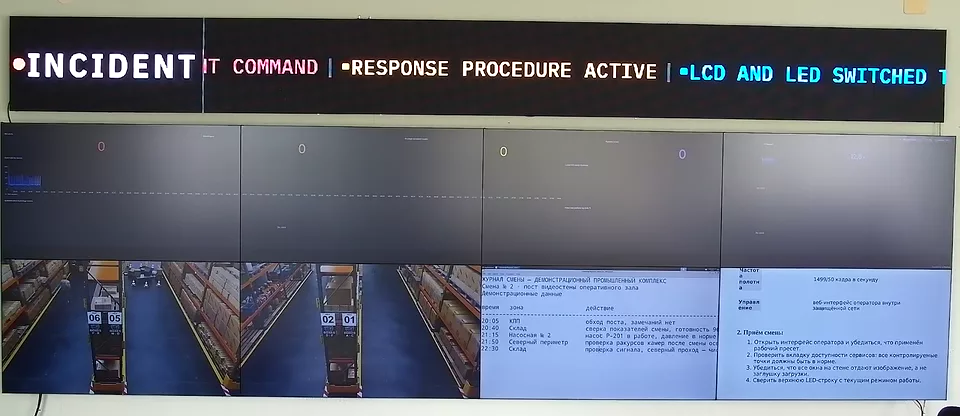
W skrócie
Ściana wideo SOC to nie dekoracyjna ściana dashboardów. To wspólna warstwa wizualna centrum operacji bezpieczeństwa: alerty SIEM, widoki ścieżek ataku, telemetria punktów końcowych, kanały kamer VMS, kolejki incydentów, panele threat intelligence i dashboardy kondycji usług na jednym kontrolowanym płótnie. Ten przewodnik mapuje praktyczny miks źródeł dla ściany wideo SIEM, w tym Splunk, ELK Stack / Elastic, Microsoft Sentinel, IBM QRadar, Wazuh, Genetec i źródła VMS typu Milestone.
Ściana wideo dla SOC: lista kontrolna nabywcy
Nabywca szukający ściany wideo dla SOC zwykle rozstrzyga, czy pomieszczenie potrzebuje signage, sprzętu AV czy operacyjnego oprogramowania ściany wideo. Dla centrum operacji bezpieczeństwa ścianę należy wyspecyfikować wokół reakcji na incydenty: alerty SIEM, drill-down analityka, dowody VMS, przypisanie odpowiedzialności za reakcję i bezpieczne dla operatora promowanie źródeł. Jeśli ściana nie potrafi panować nad poświadczeniami, kondycją źródeł, układami i ścieżką audytu, nie jest gotowa do pracy w SOC.
Ściana wideo SIEM: co należy na ścianę
Pierwszym błędem w zakupie ściany SOC jest traktowanie SIEM jako jedynego źródła. SIEM to kręgosłup alertów, ale ściana zasługuje na swoje miejsce, gdy zespół może widzieć kontekst alertu obok telemetrii i fizycznych dowodów. Praktyczna ściana wideo SIEM utrzymuje cztery warstwy widoczne podczas incydentu:
- Warstwa alertów: Splunk Enterprise Security, Microsoft Sentinel, IBM QRadar, Elastic Security / ELK Stack, Wazuh lub obecna konsola SIEM nabywcy.
- Warstwa telemetrii: dashboardy EDR / XDR, stan zapory, zdarzenia dostawcy tożsamości, ekspozycja na podatności i podsumowania przepływów sieciowych.
- Warstwa wizualna: siatki kamer VMS z Genetec, Milestone lub równoważnych systemów, plus kamery szaf w centrum danych tam, gdzie liczy się dostęp fizyczny.
- Warstwa reakcji: ServiceNow, Jira, PagerDuty, status mostka incydentu, notatki zmiany i kontakty eskalacyjne.
Ten miks jest powodem, dla którego ściana SOC potrzebuje renderowania w przeglądarce, ingestu kamer RTSP / NDI, IP-KVM, nazwanych układów i sterowania operatora opartego na rolach. Czysty odtwarzacz signage może pokazać ekran SIEM, ale nie może stać się powierzchnią sterowania aktywną reakcją.
Referencyjny układ ściany wideo SOC
Użyteczna ściana wideo SOC zaczyna się od tej samej dyscypliny co ściana wideo NOC: projektuj wokół obciążenia incydentowego, a nie wokół liczby dashboardów w spokojnym okresie. Dla 8-wyświetlaczowej ściany SOC powszechną bazą jest:
- 2 wyświetlacze na kolejkę alertów SIEM i oś czasu ataku.
- 1 wyświetlacz na stan punktów końcowych o wysokiej istotności EDR / XDR.
- 1 wyświetlacz na tożsamość, zaporę, VPN i postawę bezpieczeństwa chmury.
- 2 wyświetlacze na kamery VMS, kamery centrum danych lub zdarzenia bezpieczeństwa fizycznego.
- 1 wyświetlacz na zgłoszenia incydentów i przypisanie eskalacji.
- 1 elastyczny wyświetlacz na promowane źródło: przechwytywanie pakietów, drill-down dashboardu lub stację roboczą analityka przez IP-KVM.
W przypadku ściany 16-wyświetlaczowej nie podwajaj po prostu siatki. Dodaj drugi tor incydentowy: jeden tor na aktywną reakcję na incydent, jeden tor na stały dyżur. To pozwala uniknąć powszechnego trybu awarii, w którym ściana staje się nieczytelna podczas dużego zdarzenia.
Ściana wideo Splunk, ściana wideo ELK Stack i ściana dashboardów Grafana
Ściana wideo Splunk to zwykle renderowany w przeglądarce zestaw dashboardów Splunk Enterprise Security, a nie specjalny produkt ścienny. Wymagania to stabilne uwierzytelnianie, kontrola odświeżania, oznaczanie nieaktualnych danych oraz możliwość promowania wyszukiwania lub widoku notable-event bez ujawniania całej stacji roboczej analityka.
Ściana wideo ELK Stack podąża tym samym wzorcem przez dashboardy Kibana / Elastic. Traktuj każdy dashboard jako źródło ściany z właścicielem, interwałem odświeżania, stanem zapasowym i modelem dostępu. Jeśli token dashboardu wygaśnie o 03:00, ściana powinna pokazać widoczny błąd uwierzytelniania, a nie pusty kafelek czy nieaktualny zrzut ekranu.
Ściana dashboardów Grafana lub ściana wideo Grafana to ten sam wzorzec operacyjny dla paneli telemetrii. W SOC często niesie kondycję infrastruktury, anomalie tożsamości, obciążenie zapory, status punktów końcowych lub dostępność platform obok SIEM. W czystym centrum operacji sieciowych użyj architektury ściany wideo centrum operacji sieciowych jako głównego towarzysza.
Wymagania ściany centrum operacji bezpieczeństwa
Fraza ściana centrum operacji bezpieczeństwa pojawia się zwykle, gdy nabywca wciąż wybiera między sprzętem AV, signage a oprogramowaniem sterowania ścianą wideo. Właściwe wymagania są operacyjne, nie dekoracyjne:
- Lokalnie lub ze zdolnością air-gap: telemetria SOC i kanały kamer nie powinny wymagać zewnętrznej płaszczyzny sterowania SaaS do renderowania. Skorzystaj z przewodnika po ścianie wideo air-gap wtedy, gdy działanie bez chmury jest wymogiem zakupowym.
- Izolacja źródeł: jedna uszkodzona kamera RTSP, dashboard lub sesja SIEM nie może wygasić całego płótna.
- Bezpieczne dla operatora sterowanie: kierownik zmiany może promować lub przestawiać źródła bez ujawniania poświadczeń na ścianie.
- Ścieżka audytu: presety, zmiany źródeł i promowane widoki incydentów powinny dać się odtworzyć po przeglądzie incydentu.
- Przejrzystość modelu kosztów: porównaj subskrypcję per wyświetlacz, odświeżanie appliance'ów, wsparcie i cykl życia serwerów w jednym kalkulatorze TCO ściany wideo.
Gdzie pasuje Craft Wall
Craft Wall pasuje do ścian SOC i SIEM tam, gdzie nabywca chce lokalnego serwera Linux, dashboardów przeglądarkowych jako pełnoprawnych źródeł, kanałów wideo RTSP / NDI, nazwanych układów incydentów i licencji wieczystej zamiast subskrypcji per wyświetlacz. Nie jest właściwą odpowiedzią, gdy decydującym wymogiem jest duży, zarządzany w chmurze, wielolokalizacyjny park z gotowymi integracjami enterprise. W takim przypadku przed decyzją uczciwie porównaj stronę alternatywa dla Userful.
Stosy z kontrolerem sprzętowym, takie jak Datapath, wciąż mogą pasować do projektów AV stawiających najpierw na appliance. Jeśli SOC zastępuje park Fx4 / WallControl, przejrzyj ścieżkę migracji alternatywa dla Datapath Fx4 i zamodeluj cykl odświeżania przed zakupem kolejnego appliance'a.
Język zapytań o ścianę wideo SOC dla intencji nabywcy
Dla fraz intencyjnych takich jak ściana centrum operacji bezpieczeństwa, ściana wideo SIEM, ściana wideo Splunk i ściana wideo ELK Stack trzymaj miks źródeł strony jawny: alerty SIEM, kanały kamer bezpieczeństwa, telemetria, ticketing i szybki przepływ promowania. Nabywcy używający tego sformułowania zwykle oczekują, że ściana pozostanie czytelna podczas incydentu bez zmiany pierwotnych elementów sterowania dyspozytorni lub konsoli.
- Dopasowanie słowa kluczowego do strony: najpierw skieruj tych wyszukujących do nazwanej architektury ściany SOC, a następnie zweryfikuj względem architektury referencyjnej NOC oraz przewodnika po ścianie wideo dla dyspozytorni energetycznej.
- Krótka lista handlowa: porównaj ten sam zestaw stron względem glosariusza AV-over-IP pod kątem transportu źródeł, a następnie wybierz spośród alternatywa dla Datapath Fx4, alternatywa dla Userful i najlepsze oprogramowanie ścian wideo w zależności od tego, czy nabywca stawia najpierw na zgodność, na sterowanie, czy na koszt.
- Wzorzec konwersji: dołącz krótką ścieżkę do kalkulatora TCO ściany wideo dla scenariuszy 8- i 16-wyświetlaczowych, a następnie do przewodnika po doborze ściany wideo w celu zmniejszenia tarcia od zapytania do zakupu.
- Mapa zapytanie-do-listy-kontrolnej: dla stron intencyjnych ściana centrum operacji bezpieczeństwa, ściana wideo Splunk i ściana wideo ELK Stack trzymaj układ wokół pięciu klas źródeł: SIEM, kamery, telemetria, ticketing i odporny promowany widok operatora z failover.
Czytaj dalej
Korzystaj z tej strony razem z ścianą wideo centrum operacji sieciowych, porównaniem najlepszego oprogramowania ścian wideo oraz z definicjami w glosariuszu dla SOC i NOC. Pod kątem kosztów przeprowadź scenariusz 8- i 16-wyświetlaczowy w kalkulatorze kosztów ściany wideo i użyj przewodnika po doborze ściany wideo do planowania liczby źródeł. W przypadku dyspozytorni energetycznych, gdzie SCADA i reagowanie na awarie dominują w miksie źródeł, użyj przewodnika po ścianie wideo dla dyspozytorni energetycznej.