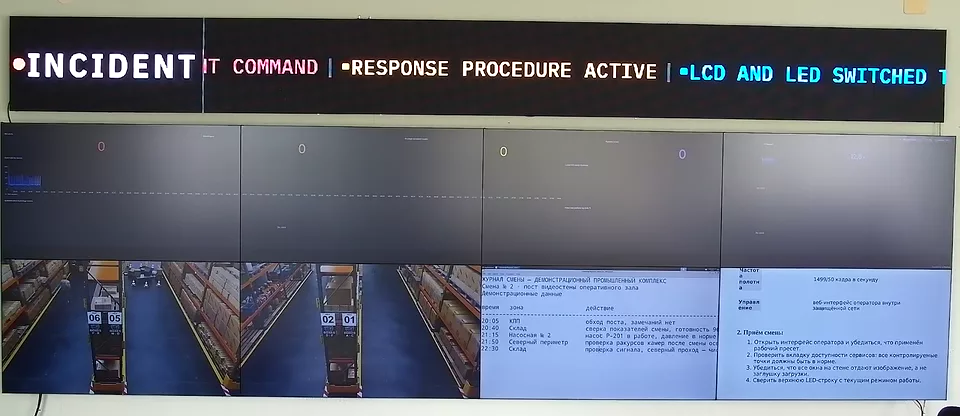
En breve
Un videowall para SOC no es una pantalla decorativa de dashboards. Es la capa visual compartida de un centro de operaciones de seguridad, reunida en un único lienzo controlado.
En ese lienzo conviven alertas del SIEM, vistas de rutas de ataque, telemetría de endpoints, señales de cámaras del VMS, colas de incidentes, paneles de inteligencia de amenazas y dashboards de estado de los servicios.
Esta guía describe la mezcla práctica de fuentes de un videowall SIEM, incluidos Splunk, ELK Stack / Elastic, Microsoft Sentinel, IBM QRadar, Wazuh y fuentes VMS como las de Genetec o Milestone.
Videowall para SOC: lista de comprobación del comprador
Quien busca un videowall para SOC suele estar decidiendo si la sala necesita cartelería digital, hardware AV o software operativo de videowall.
En un SOC, el videowall debe especificarse en torno a la respuesta a incidentes: alertas del SIEM, análisis en profundidad del analista, evidencias del VMS, responsables de la respuesta y promoción segura de fuentes por parte de los operadores.
Si el videowall no puede mantener bajo control las credenciales, el estado de las fuentes, las disposiciones y el registro de auditoría, no está preparado para el trabajo de un SOC.
Videowall SIEM: qué debe aparecer en pantalla
El primer error al comprar un videowall para SOC es tratar el SIEM como la única fuente. El SIEM es la columna vertebral de las alertas.
Pero el videowall demuestra su valor cuando el equipo puede ver el contexto de la alerta junto a la telemetría y las evidencias físicas. Un videowall SIEM práctico mantiene visibles cuatro capas durante un incidente:
- Capa de alertas: Splunk Enterprise Security, Microsoft Sentinel, IBM QRadar, Elastic Security / ELK Stack, Wazuh o la consola SIEM que el comprador utilice actualmente.
- Capa de telemetría: dashboards de EDR / XDR, estado de los cortafuegos, eventos del proveedor de identidades, exposición a vulnerabilidades y resúmenes de flujos de red.
- Capa visual: mosaicos de cámaras del VMS de Genetec, Milestone o sistemas equivalentes, además de cámaras de los racks del centro de datos allí donde el acceso físico sea relevante.
- Capa de respuesta: ServiceNow, Jira, PagerDuty, estado del puente de incidentes, notas de turno y contactos de escalado.
Esa mezcla explica por qué un videowall para SOC necesita renderizado en navegador, ingesta de cámaras RTSP / NDI, IP-KVM, disposiciones con nombre y control de operadores basado en roles.
Un simple reproductor de cartelería digital puede mostrar una pantalla del SIEM, pero no puede convertirse en la superficie de control de una respuesta activa.
Disposición de referencia de un videowall para SOC
Un videowall para SOC útil parte de la misma disciplina que un videowall para NOC: diseñar en función de la carga de incidentes, no del número de dashboards de un día tranquilo.
Para un videowall de SOC de 8 pantallas, una base habitual es:
- 2 pantallas para la cola de alertas del SIEM y la cronología del ataque.
- 1 pantalla para el estado de los endpoints con alertas de gravedad alta en EDR / XDR.
- 1 pantalla para identidad, cortafuegos, VPN y postura de seguridad en la nube.
- 2 pantallas para cámaras del VMS, cámaras del centro de datos o eventos de seguridad física.
- 1 pantalla para los tickets de incidentes y los responsables del escalado.
- 1 pantalla flexible para una fuente promovida: captura de paquetes, vista detallada de un dashboard o la estación de trabajo de un analista mediante IP-KVM.
En un videowall de 16 pantallas, no se limite a duplicar la cuadrícula. Añada una segunda franja de incidentes: una para la respuesta activa y otra para la vigilancia continua.
Así se evita el fallo habitual en el que el videowall se vuelve ilegible durante un incidente grave.
Videowall con Splunk, videowall con ELK Stack y mural de dashboards de Grafana
Un videowall con Splunk suele ser un conjunto de dashboards de Splunk Enterprise Security renderizados en navegador, no un producto de videowall especial.
Los requisitos son una autenticación estable, el control del refresco, el marcado de los datos desactualizados y la posibilidad de promover una búsqueda o una vista de eventos notables sin exponer toda la estación de trabajo de un analista.
Un videowall con ELK Stack sigue el mismo patrón con los dashboards de Kibana / Elastic. Trate cada dashboard como una fuente del videowall con un responsable, un intervalo de refresco, un estado de respaldo y un modelo de acceso.
Si el token de un dashboard caduca a las 03:00, el videowall debe mostrar un fallo de autenticación visible, no una ventana en blanco ni una captura de pantalla desactualizada.
Un mural de dashboards de Grafana o videowall con Grafana sigue el mismo patrón operativo para los paneles de telemetría.
En un SOC suele mostrar, junto al SIEM, el estado de la infraestructura, las anomalías de identidad, la carga de los cortafuegos, el estado de los endpoints o la disponibilidad de las plataformas.
Si la sala es exclusivamente un centro de operaciones de red, utilice como complemento principal la arquitectura de videowall para centros de operaciones de red.
Requisitos del videowall para centro de operaciones de seguridad
La expresión videowall para centro de operaciones de seguridad suele aparecer cuando el comprador todavía está eligiendo entre hardware AV, cartelería digital y software de control de videowall. Los requisitos correctos son operativos, no decorativos:
- Local (on-premises) o apto para air-gap (red aislada): la telemetría del SOC y las señales de las cámaras no deberían depender de un plano de control SaaS externo para mostrarse. Utilice la guía de videowall air-gap cuando la operación sin nube sea un requisito de la compra.
- Aislamiento de fuentes: el fallo de una cámara RTSP, un dashboard o una sesión del SIEM no debe dejar en negro todo el lienzo.
- Control seguro por parte del operador: el responsable de turno puede promover o reorganizar fuentes sin exponer credenciales en el videowall.
- Registro de auditoría: los presets, los cambios de fuentes y las vistas de incidentes promovidas deben poder reconstruirse en la revisión posterior al incidente.
- Claridad del modelo de costes: compare la suscripción por pantalla, la renovación de equipos dedicados (appliances), el soporte y el ciclo de vida del servidor en una misma calculadora del coste total de propiedad (TCO) del videowall.
Dónde encaja Craft Wall
Craft Wall encaja en videowalls para SOC y SIEM en los que el comprador busca un servidor Linux local, dashboards en navegador como fuentes de primera clase y señales de vídeo RTSP / NDI.
Encaja también cuando el comprador quiere disposiciones de incidente con nombre y una licencia perpetua en lugar de una suscripción por pantalla.
No es la respuesta adecuada cuando el requisito decisivo es un gran parque multisede gestionado desde la nube con integraciones empresariales listas para usar. En ese caso, estudie con honestidad la página alternativa a Userful antes de decidir.
Las soluciones basadas en controladora hardware, como Datapath, todavía pueden encajar en proyectos AV centrados en equipos dedicados (appliances).
Si el SOC va a sustituir un parque Fx4 / WallControl, revise la vía de migración de la alternativa a Datapath Fx4 y modele el ciclo de renovación antes de comprar el siguiente equipo dedicado.
Videowall para SOC: términos de búsqueda e intención de compra
Para expresiones de intención como videowall para centro de operaciones de seguridad, videowall SIEM, videowall con Splunk y videowall con ELK Stack, conviene que la mezcla de fuentes quede explícita.
Esa mezcla incluye alertas del SIEM, señales de cámaras de seguridad, telemetría, gestión de tickets y un flujo rápido de promoción de fuentes.
Los compradores que usan estas expresiones suelen esperar que el videowall siga siendo legible durante un incidente sin cambiar los controles primarios de despacho ni de consola.
- Correspondencia entre búsqueda y página: asocie primero estas búsquedas a una arquitectura concreta de videowall para SOC y después contrástela con la arquitectura de referencia para NOC y la guía de videowall para salas de control de energía y servicios públicos.
- Preselección comercial: contraste ese mismo conjunto de páginas con la definición de AV sobre IP del glosario para el transporte de fuentes y elija después entre la alternativa a Datapath Fx4, la alternativa a Userful y el mejor software de videowall, según el comprador priorice el cumplimiento normativo, el control o el coste.
- Patrón de conversión: incluya un camino corto hacia la calculadora de TCO del videowall para escenarios de 8 y 16 pantallas y, después, hacia la guía de dimensionamiento del videowall para reducir la fricción entre la búsqueda y la compra.
- Correspondencia entre búsqueda y lista de comprobación: en las páginas de intención de videowall para centro de operaciones de seguridad, videowall con Splunk y videowall con ELK Stack, organice la disposición en torno a cinco clases de fuentes: SIEM, cámaras, telemetría, gestión de tickets y una vista de operador promovida y resiliente, con conmutación por error (failover).
Qué leer a continuación
Utilice esta página junto con la arquitectura de videowall para centros de operaciones de red, la comparativa del mejor software de videowall y las definiciones del glosario de SOC y NOC.
Para los costes, ejecute un escenario de 8 pantallas y otro de 16 en la calculadora de costes del videowall y utilice la guía de dimensionamiento del videowall para planificar el número de fuentes.
Para salas de servicios públicos en las que SCADA y la respuesta ante cortes de suministro dominan la mezcla de fuentes, utilice la guía de videowall para salas de control de energía y servicios públicos.